
For instructors teaching software development, one of the biggest logistical challenges is assignment distribution and feedback at scale. How do you give large groups of students access to course materials, keep solution code private, and still deliver meaningful, contextual feedback without lots of administrative overhead?
The GitLab for Education program provides qualifying institutions with free access to GitLab Ultimate, enabling instructors to build professional-grade workflows that mirror real-world software development environments. In this article, you'll learn how Stephen G. Dame, a lecturer in the Computing and Software Systems department at the University of Washington, Bothell, uses simple workflows in GitLab to manage everything from course materials to student feedback across multiple classes.
From aerospace to academia: Bringing GitLab to the classroom
Dame came to academia with years of experience as a chief software engineer at Boeing Commercial Airplanes, where GitLab was used for aerospace projects. As an adjunct professor, he became an early advocate for GitLab within the university, joining the GitLab for Education program to access the full feature set needed to run structured, scalable course workflows.
"GitLab provides the greatest way to organize multiple classes, student assignments, lectures, and code samples through the use of Groups and Subgroups, which I found to be unique to GitLab compared to other repository platforms."
- Stephen G. Dame, University of Washington, Bothell
Set up groups: Build the right structure before writing a line of code
The foundation of an effective GitLab-based course is a well-planned group hierarchy. GitLab's Groups and Subgroups allow instructors to model the natural structure of a university department institution, course, and role with precise, inheritable permissions at every level.
Dame's structure places the university at the root (UWTeaching), with each course occupying its own subgroup (e.g. css430). Within each course sit repositories for lecture-materials and code, alongside dedicated Subgroups for students and graders. Instructor materials remain private, while student and grader subgroups are configured with controlled permissions so that assignment briefs and solutions are visible only to the right people.

Permissions cascade downward through the hierarchy via Manage > Members, allowing Dame to add students to a course's students subgroup with Reporter access and an expiration date tied to the end of the academic quarter. Students can clone and pull from assignment repositories but cannot push — keeping solution code firmly under instructor control.
Students are guided to set up SSH keys across all their working environments (local machines, cloud shells, virtual machines) so they can clone repositories and receive weekly updates via git pull. They copy relevant code into their own private repositories to manage their own version history.
Tip for large classes: For larger cohorts, adding students by hand is impractical. GitLab's REST API lets you automate subgroup creation and membership from a list of usernames. Below is a sample Python script that handles this:
          import gitlab
    from datetime import datetime

    # Connect to your GitLab instance
    gl = gitlab.Gitlab('https://gitlab.com', private_token='YOUR_PRIVATE_TOKEN')

    # Target parent group ID (e.g., the ID for "css430 > students")
    parent_group_id = 12345678

    # Set expiration: typically the beginning of the next month after quarter end
    expiry_date = '2025-01-01'

    # List of collected student usernames
    student_list = ['alice_css430', 'bob_css430', 'carol_css430', 'dave_css430', 'eve_css430']

    for username in student_list:
        try:
            # 1. Create a personal subgroup for the student
            subgroup = gl.groups.create({
                'name': username,
                'path': username,
                'parent_id': parent_group_id,
                'visibility': 'private'
            })

            # 2. Add student to the new subgroup with Expiration
            user = gl.users.list(username=username)[0]
            subgroup.members.create({
                'user_id': user.id,
                'access_level': gitlab.const.REPORTER_ACCESS,
                'expires_at': expiry_date
            })
            print(f"Success: Subgroup created and student added for {username}")
        except Exception as e:
            print(f"Error processing {username}: {e}")
There is also an open source project that automates class management published by GitLab that provides additional tooling for this workflow.
Give feedback where the work actually lives
Once the structure is in place, the feedback workflow is where GitLab's value becomes most apparent to students. Dame asks students to submit assignments by opening a merge request in their repository. This gives instructors an immediate, clean diff of everything the student has written.
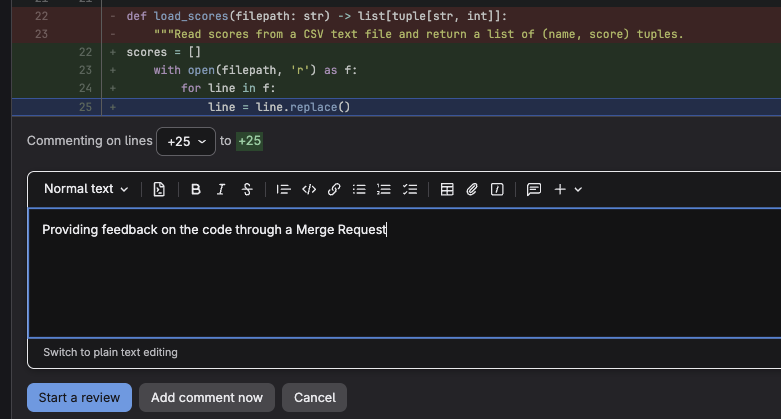 Instructors can click any line of code and leave an inline comment — not just flagging what is wrong, but explaining why, and pointing to what to look at next. Students receive this feedback in direct context with their code, which is far more actionable than a comment at the bottom of a submitted document.
Join GitLab for Education
Setting up your first GitLab assignment takes some initial effort, but once the structure is in place it largely runs itself. The real payoff goes beyond organization: Students graduate having worked daily in an environment that mirrors professional software development, building habits around version control and code review rather than learning them as abstract concepts.
If you are just getting started, keep it simple. Begin with a single course group, one assignment template, and a basic pipeline. The structure will grow naturally alongside your confidence with the platform.
Make sure to sign up for GitLab for Education so that you and your students can access all top-tier features, including unlimited reviewers on merge requests, additional compute minutes, and expanded storage.